Breaking Down Language Barriers in EdTech: How Primary Handwriting is Going Global
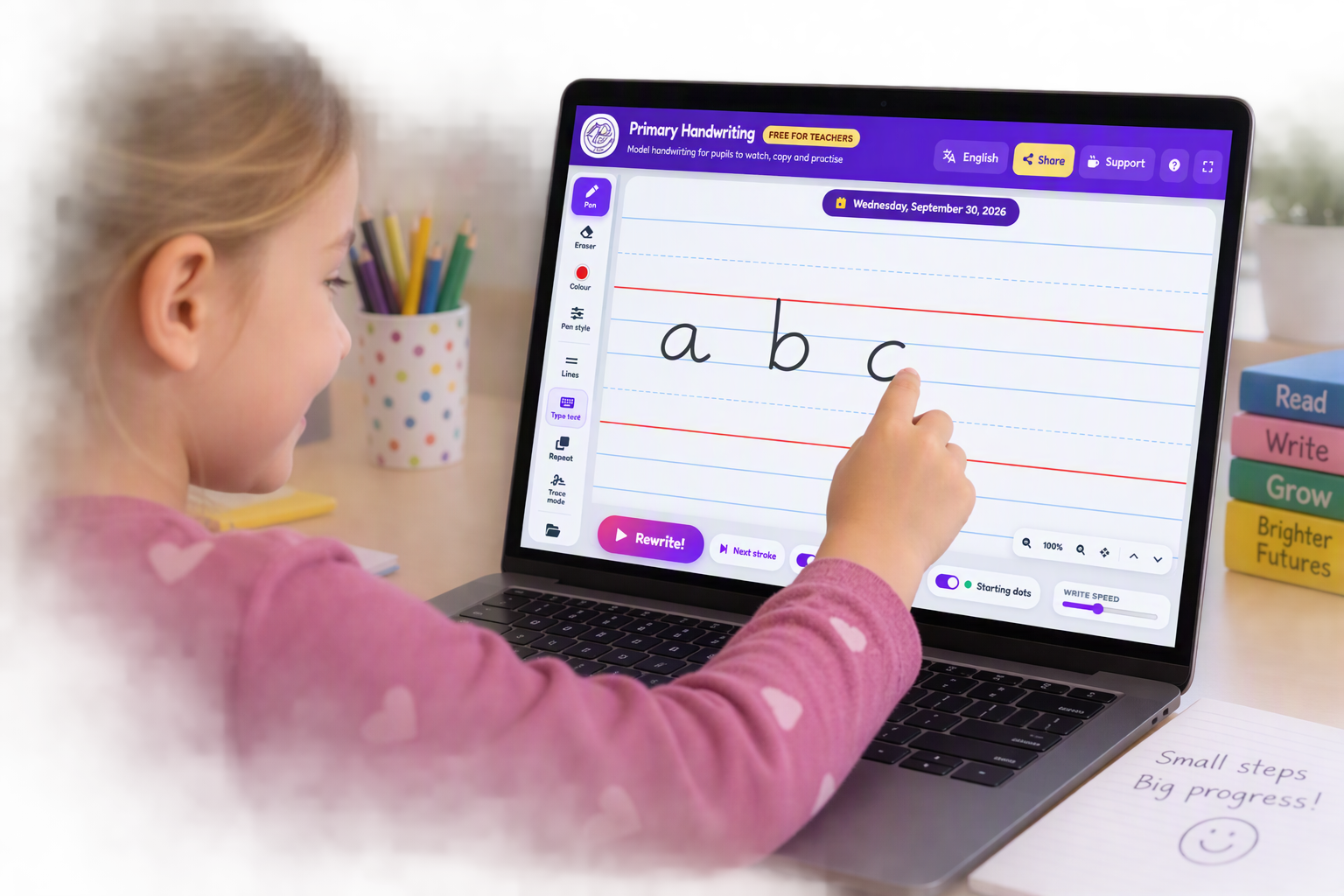
In modern primary and elementary education, handwriting instruction often presents a surprisingly tough digital challenge. While interactive whiteboards, tablets, and digital learning platforms have transformed reading, mathematics, and science, basic letter formation has frequently remained rooted in static worksheets or outdated flash animations. Recently, however, educators across international schools, bilingual academies, and primary classrooms worldwide have been discussing a noticeable shift toward a purpose-built web tool: Primary Handwriting, developed by iG Education Limited.
What is driving its widespread adoption across different continents? A closer look at current edtech discussions highlights three key drivers: seamless multilingual accessibility, flexible teaching controls, and frictionless Google Workspace integration.
The Power of a Simple Language Toggle
Teaching handwriting in multi-lingual or English as an Additional Language (EAL) environments often introduces subtle friction points:
Technical jargon in navigation menus can confuse international support staff or non-native speaking teaching assistants.
Students in bilingual or immersion settings often need instructions or interface cues in their home language.
Teachers frequently waste valuable lesson time adjusting complex language preferences inside account menus.
The Primary Handwriting Tool resolves this by placing a simple, highly visible language toggle button directly on the main interface.
With a single tap, teachers or students can instantly toggle between multiple global languages. This one feature has opened up massive global utility:
International & British Schools Abroad: Native English-speaking teachers working alongside local teaching assistants in South America, Europe, the Middle East, and Asia can navigate the tool without friction.
EAL / ESL Classrooms: Students learning English letter formation can interact with a digital interface that feels welcoming and accessible in their native language.
MFL & Modern Language Instruction: Teachers delivering French, Spanish, German, or other foreign language writing lessons can maintain a language-rich environment on the main class display.
Designed for Modern Classroom Workflows
Beyond its multilingual framework, the underlying pedagogical design is built around how teachers actually structure a 10-to-15-minute handwriting session:
1. Interactive Teacher Modelling
At the core of the app is live demonstration. Educators project the digital canvas onto an interactive whiteboard to model real-time letter formation, cursive joins, or whole sentences. Watching a live stroke trajectory builds better spatial awareness and motor planning than looking at a finished static letter on a poster.
2. Multi-Backgrounds & Visual Accessibility
Classrooms serve diverse groups of learners, including children with visual stress or dyslexia. The tool allows teachers to instantly switch backgrounds:
Standard Lines & Tramlines: Tailored for early years letter sizing and ascending/descending tail control.
Specialized Layouts: Grid styles, four-line guidelines, and dotted tracing lines.
Color Overlays: Easy switching to pastel or low-contrast backgrounds (like yellow, peach, or blue) to reduce glare and visual strain for neurodiverse students.
3. Quick Customization of Pens and Paper
A major hassle with legacy tools is navigating nested sub-menus just to change a line width or ink color. Primary Handwriting offers instant digital pen controls:
Adjust pen thickness or style (fountain pen, felt tip, pencil) to match student age groups.
Switch ink colours rapidly to emphasize starting points, direction arrows, or specific cursive join strokes.
Seamless Cloud Integration & Sharing
A common complaint on education forums regarding digital whiteboards is the "walled garden" effect—where modeled work is trapped on a board and disappears the moment the screen turns off.
Primary Handwriting addresses this by building direct bridges to cloud storage and classroom portals:
Direct Google Drive Export: Teachers can save modeled writing demonstrations straight into their Google Drive folder with one click. This makes it effortless to archive exemplar work, print customized practice sheets, or pull up prior demonstrations for review.
Instant URL Sharing: Instead of forcing parents or colleagues to download heavy video files, teachers can share live writing demonstrations via a quick shareable link. This is ideal for sharing via Google Classroom, Seesaw, or class blogs so students can rewatch modelling at home.
Discussion Points for Educators
As schools re-evaluate their digital toolkit for the upcoming academic term, tools developed by iG Education Limited highlight a growing trend in educational software: lightweight, highly specific web apps that remove login barriers and prioritize global accessibility.
How does your school currently handle digital handwriting modelling on interactive screens?
Would an instant multilingual toggle make digital tools more accessible for your EAL learners or teaching assistants?
Feel free to test out the tool directly at www.primaryhandwriting.com and share your thoughts or favorite classroom setups in the comments below!